As a PLM consultant, I’m always looking for ways to streamline delivery workflows. When I had the opportunity to test whether AI could automate task creation directly from project requirement documents into Slack, it seemed like a straightforward win. It wasn’t — and what I learned in the process is worth sharing with anyone using AI as part of their professional toolkit.
The Goal
The objective was simple: take structured project requirement documents, extract tasks mapped to each team member with due dates and phases, and push them automatically into our Slack task list. No manual copying, no missed assignments.
I used Claude to help design and build this workflow.
What Worked Well
The AI performed impressively on several fronts:
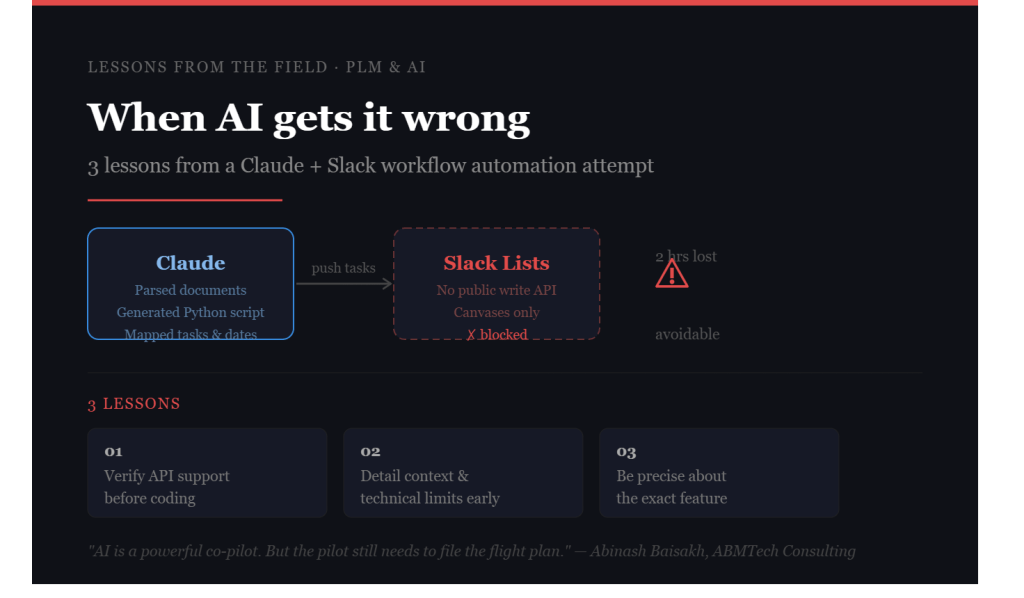
– Parsed requirement documents and extracted structured task data accurately
– Mapped tasks to team members with correct phase sequencing and due dates
– Generated a working Python script to interface with the Slack API
– Helped troubleshoot Windows-specific terminal issues — including the difference between “export” (Linux/Mac) and “set” (Windows CMD), missing pip installations, and PATH configuration errors
For document analysis and script generation, AI proved to be a genuinely powerful co-pilot.
Where It Fell Apart
After a significant amount of troubleshooting, we hit a fundamental blocker: the Slack API does not support writing rows to Slack Lists programmatically. Only Slack Canvases are editable via the API. Slack Lists — the structured, table-style task boards — have no public write API at the time of writing.
Three Lessons for Anyone Using AI in Automation Projects
- Verify API support before writing a single line of code
Not every UI feature in a platform has an API equivalent. Before starting any automation project, confirm that the specific action you need — not just the general platform — is supported via API.
2. Importance of detailing the Context
Even I had provided all the inputs in a structured manner, still there are scenarios where the API support is not available so it is always good to detailing out the context with understanding the technical limitations well in advance before proceeding further.
3. Be precise about the feature you are targeting
In this specific example, Even if there are different API available for multiple Slack Actions but the specific Slack tasks did not have any API to automate the process.
The Broader Point
Despite the outcome, this experience reinforced something important: AI is genuinely transformative for structured analysis, document parsing, and script generation. The gap is not in capability — it is in how we set up the problem in the first place.
As PLM consultants, we are trained to define requirements before solution design. The same discipline applies when working with AI. Garbage in, garbage out has not gone away — it has just moved upstream.
AI is a powerful co-pilot. But the pilot still needs to file the flight plan.
About the author: Abinash Baisakh is a PLM Solution Architect and Director of ABMTech Consulting Limited, delivering PLM configuration, migration, integration and AI-augmented consulting to clients across the UK and US.


Leave a Reply